
New MinIO Adaptor Released, plus a DHIS2 to MinIOData Lake Template
We're excited to announce two things at once: a new MinIO adaptor, and a ready-to-use template, DHIS2 to MinIO, that puts it to work landing DHIS2 analytics data straight into a data lake.
OpenFn in the ingestion layer
Workflow automation engines like OpenFn are optimized for event-driven, logic-heavy, multi-step process automation—coordinating systems, enforcing business rules, and triggering actions in real or near-real time. That makes OpenFn a strong fit for one common data warehouse pattern: ingesting and transforming in-flight data from many different, high-volume source systems, each with its own authentication, pagination, and business logic.
OpenFn's fine-grained control and its purpose-built adaptors for government, health sector, and financial systems make it a natural fit for the ingestion side of a data warehouse architecture rather than the transformation side. In a typical setup, source systems (DHIS2, EMRs, facility registers, national platforms) emit events and API data; OpenFn's job is to authenticate, query, paginate, extract, validate, and reliably land that data somewhere durable, on a schedule or event-based trigger you control.
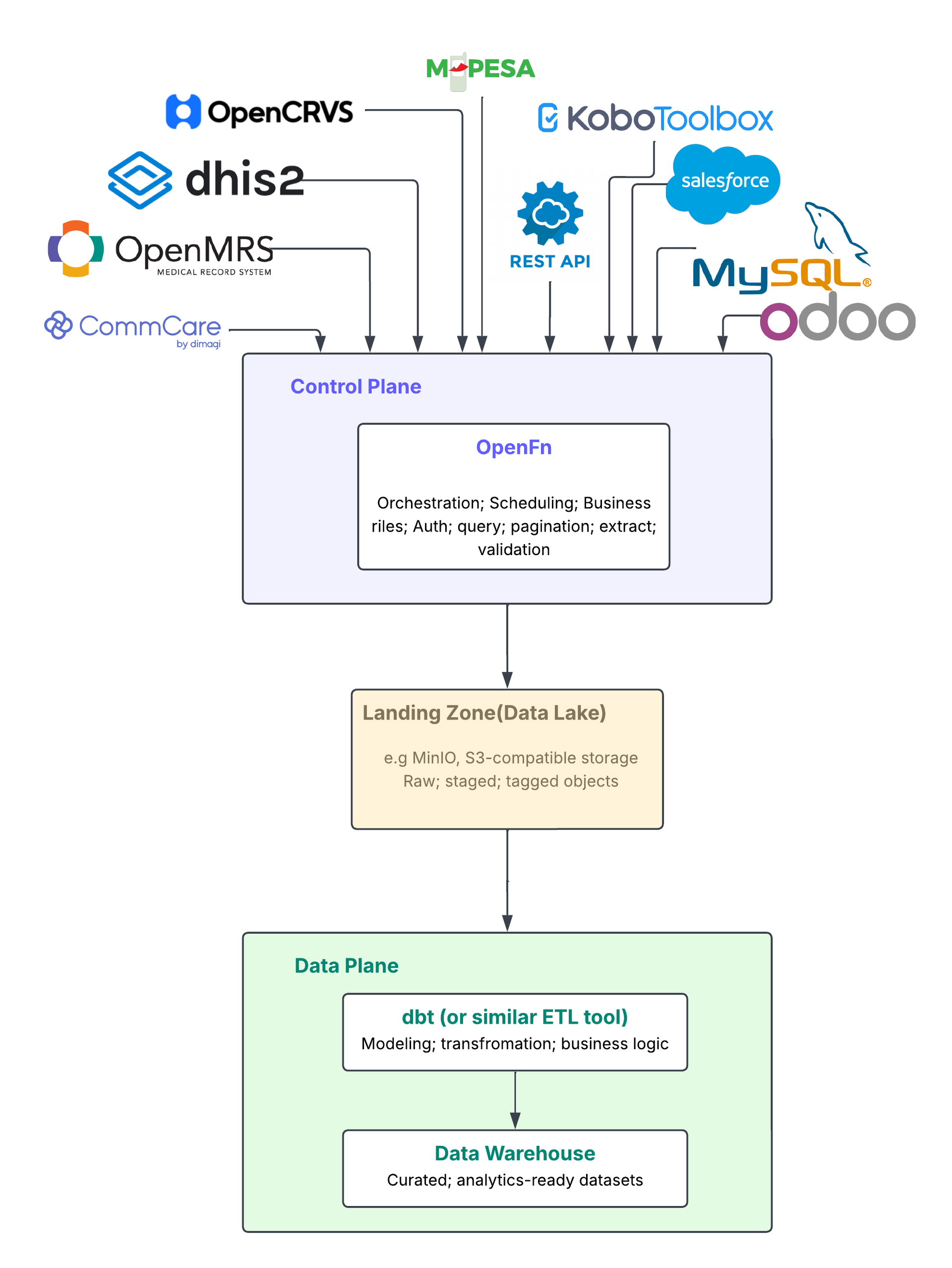
There is one caveat, and it's about scale. Operations such as schema-mirroring replication from one database to another, or full-table historical backfills of millions of records, are better handled by a dedicated bulk-loading tool like Airbyte or Fivetran — purpose-built for that kind of multi-hour, mechanical transfer. And once data has landed, a dedicated ELT tool (dbt, for example) takes over the heavy modeling and transformation work inside the warehouse itself. OpenFn stays in its lane—extract and load—and hands off cleanly once the data has landed, keeping the orchestration ("control plane") separate from the transformation logic ("data plane").
That handoff point needs a landing zone, and that's where MinIO comes in. MinIO is S3-compatible object storage, which makes it a natural raw/staging layer for a data lake or warehouse: cheap to write to, easy to organize by source and date, and readable by virtually any downstream ELT or analytics tool.
The OpenFn MinIO adaptor
The new @openfn/language-minio adaptor gives your workflows direct read/write access to a MinIO (or any S3-compatible) bucket. It exposes:
createBucket(bucketName, [region], [options]): create a new bucket, optionally with object locking enabledputObject(bucketName, objectName, data, [options]): upload an object (JSON, NDJSON, CSV, or raw), with support for custom content types and metadatagetObject(bucketName, objectName, [options]): retrieve and optionally parse an object as JSON, NDJSON, or CSVlistObjects(bucketName, [options]): list objects in a bucket, with prefix filtering and recursive listinggetObjectTags(bucketName, objectName) / setObjectTags(bucketName, objectName, tags, [putOpts]): read and write object tags, useful for marking data as raw vs. processed, tracking source system, etc.
Together, these cover the core pattern of a landing zone: write raw extracts in, tag them, list what's there, and read them back out for downstream processing.
The template: DHIS2 to MinIO
To show the adaptor in action, we've published a template that pulls DHIS2 analytics data and writes it into a MinIO bucket as structured JSON snapshots — a real extract-and-load pipeline from a live source system into a data lake.
The example workflow (built against an EPI/immunization use case) does the following:
- Fetch EPI data elements from DHIS2 — starts with a clearly marked configuration block where you set your own data element group ID(s), org unit ID, and reporting period range (start/end), then looks up data element groups, collects all data element IDs, and chunks them into small batches so each analytics request stays within DHIS2's limits.
- Pull analytics data from DHIS2 — sequentially works through each org unit level (facility, district, region, etc.) and each reporting period, pulling analytics values chunk by chunk. Processing levels one at a time (rather than firing them all at once) keeps requests manageable and avoids overwhelming the DHIS2 instance.
- Upload analytics snapshot to MinIO — writes one JSON object per org unit level and period to the bucket, under a path like
raw/analytics/epi/level_<n>/<period>.json, each tagged with its source, extraction time, and the query that produced it. The result is a raw, well-organized landing zone in MinIO that a downstream ELT tool can pick up and load into a warehouse's staging tables.
Key features
- Chunks large data element lists automatically to stay within DHIS2 request limits
- Processes org unit levels sequentially, so it scales to instances with a lot of analytics data without overwhelming the source system
- Writes each period/level combination as its own JSON object, with source metadata baked in (source system, extraction timestamp, query parameters)
- Runs on a schedule (cron trigger, disabled by default so you can configure it first)
Who should use it
This template is a good starting point for anyone who needs to move DHIS2 analytics (or similar large, paginated API data) into an object-storage landing zone ahead of warehouse transformation — national data warehouse implementations, program M&E teams building a Data Vault or similar model downstream, or anyone standardizing on MinIO/S3 as their raw layer.
Under the hood
@openfn/language-dhis2@8.0.13— fetches data element metadata and analytics values from the DHIS2 API@openfn/language-minio@1.1.2— writes the resulting JSON snapshots to a MinIO bucket
Getting started
- Log in to your OpenFn account at app.openfn.org (or register here for a free cloud project).
- In your project workspace, click Create Workflow.
- Search for the template by name:
DHIS2 to MinIO, or use tags:dhis2,minio,datalake,analytics,warehouse - Connect your credentials: add your DHIS2 credentials to the
Fetch EPI data elements from DHIS2andPull analytics data from DHIS2jobs, and your MinIO credentials to theUpload analytics snapshot to MinIOjob. - Configure the template for your instance (see below), then test and enable it.
Configuring the template
The Fetch EPI data elements from DHIS2 job has a clearly marked "CONFIGURE ME" block at the top where you set:
epiGroupId— your own DHIS2 data element group ID(s)orgUnitId— the org unit to scope analytics queries tostartPeriod / endPeriod— your reporting period range (YYYYMM); periods are generated automatically between them A couple of things live outside that block and need a look too:orgUnitLevelsin thePull analytics data from DHIS2job (defaults to[1, 2, 3, 4, 5]) — adjust to the levels you actually want to pull- The MinIO bucket name ("
test" in the example) and object path prefix in theUpload analytics snapshot to MinIOjob Run the workflow manually first and check the logs, then enable the cron trigger (disabled by default, currently set to0 0 * * *— daily at midnight) once you're happy with the output.
A couple of caveats
- The period generator assumes a 12-month calendar. If your DHIS2 instance uses a calendar with a different number of periods per year (e.g. the Ethiopian 13-month calendar), you'll need to adjust
generatePeriods()in the first job. - If your instance has a large number of data elements, org unit levels, or periods, a single run can add up to a lot of DHIS2 requests. If you hit timeouts, narrow the period range per run or split the workflow to process one org unit level at a time.
Happy automating!

Written by
Aisha Hassen